


Tennis TV - Live Streaming
3.1353.00 Reviews
App Specs
- Version
- Varies with Device
- Updated On
- License
- Free
- Downloads
- 1,000,000+
- Developer
- ATP Media Operations Ltd
- Categories
- Sports
- Platform
- Android, iOS
Screenshots




 Analysis by AppCompare
I judge sports apps less by the promise of live coverage than by whether they fit into an ordinary day: finding the match I care about, picking up after an interruption, and knowing what I’m paying for. Tennis TV - Live Streaming is aimed squarely at ATP tennis fans, and its value depends on how often you want to follow that tour rather than sport in general. I’d treat it as a specialist viewing option, not an all-purpose sports service.
Where match-day use can get awkward
The first practical hurdle is deciding what kind of viewing you expect. A live match asks for time and a reasonably steady connection; a replay or highlight is easier to fit around work, travel, or family plans. I find it useful to decide which one I want before opening the app, especially when several matches are being played at once. Otherwise, browsing can become its own activity and eat into the time I meant to spend watching.
There is also a difference between keeping up with a tournament and casually checking a score. A dedicated tennis service makes more sense when I want to watch points unfold, revisit a match, or compare what is happening across courts. If I only want a quick result, a sports news or score app is usually the faster choice. That distinction matters: the streaming experience is the reason to choose this app, but it is more than some viewers need.
On a busy day, I would use it in short, planned windows rather than assume I can follow every match from beginning to end. For example, I might check in during a lunch break, watch a stretch of a live match, then use a replay later if I have more time. That approach makes the service easier to fit around real life and avoids treating a long match as an all-or-nothing commitment.
Checks that help before you press play
Before blaming the app for a problem, I’d check the basics: whether the device has a stable internet connection, whether other streaming services are working normally, and whether I have selected the match or replay I meant to watch. Moving from a weak mobile connection to reliable Wi-Fi can help with streaming interruptions, though it cannot fix every source of trouble. If a stream starts but struggles, giving the connection a moment to settle is a sensible first step.
I’d also check the account and subscription situation before a major match, rather than discovering a sign-in or access issue at the moment I want to watch. The app is free to download, but in-app purchases are listed from $16.99 to $94.99 per item, so I would review the purchase details shown in the app and confirm that the option suits my needs before committing. The right plan depends on what is offered to me at the time; I would not assume that downloading the app alone means every stream is included.
For someone setting it up on a phone, one useful habit is to test playback before leaving home or starting a commute. That separates a device or account issue from a poor connection on the move. If I plan to watch on a larger screen, I would test that arrangement in advance too, rather than assume that a setup that works on a phone will behave exactly the same elsewhere.
Worth Reading Before You Choose

Flipboard Shows What News Apps Must Do Beyond the Feed

Switching to Android Auto Means Rethinking Your Driving Routine

Google Calendar Makes a Crowded Week Easier to Manage

Ludo King Makes the Most of the Minutes Between Plans

Baby Panda World Brings Quick Play to Modern Phones, but Its Game Library Feels Busy

ESPN’s Live Game View Makes Following Close Games Easier
Getting back to a match after an interruption
Live sports rarely wait for a convenient moment. If a call, commute, or household task pulls me away, I’d first look for a replay or highlight instead of repeatedly trying to jump back into a live stream. That gives me a practical fallback when I cannot stay with the match in real time. For a close finish, a replay is more useful than a short highlight; for a quick catch-up, highlights may be enough.
When playback misbehaves, I’d try a straightforward recovery path: check the connection, close and reopen the app, then return to the match or on-demand item. If only one stream is affected while other video plays normally, the issue may be tied to that particular content or moment rather than the whole app. I would avoid making multiple changes at once, because testing one step at a time makes it easier to see what actually helped.
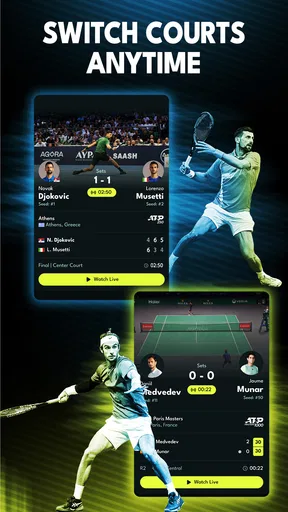
There is a trade-off in switching between courts, too. Multi-court coverage can help when two matches interest me, but hopping around constantly makes it easy to lose the context of both. I get more from choosing a main match and treating another court as a check-in, rather than channel-surfing every few points. For a tournament day, that small bit of discipline improves the experience more than trying to watch everything at once.
When the service may not be the source of trouble
A stalled stream is frustrating, but it does not automatically mean the app itself is at fault. A weak or crowded connection, a temporary device problem, or an issue affecting one particular stream can all produce similar symptoms. Comparing playback on another network or trying another piece of video, when practical, can help narrow down what is happening. If other apps are also struggling, I’d investigate the connection before reinstalling anything.
Match availability can also depend on what the service is showing at that moment and on the access attached to the account. I would check the in-app event and purchase information rather than assume every match is available in the same way. That is especially important if I am choosing the app for a particular player or tournament: a tennis-focused service is not a guarantee that every tennis event I care about will be part of my viewing routine.
For support questions, it helps to note whether the problem affects live playback, replays, or sign-in, and what connection I was using. Those details make a report more useful than simply saying that the app does not work. If the problem disappears on a different network, that points me toward connectivity; if it follows one account or one item across attempts, I would look at access or the content itself.
All About the Game
So, what exactly does Tennis TV - Live Streaming offer? Well, imagine having access to over 2,000 ATP matches every year, right in the palm of your hand. This app promises a front-row seat to all the action, which is perfect for those of us who can’t always be glued to the TV. Whether you’re on a break at work or simply chilling at a café, you can watch your favorite players battle it out live.
Features That Serve
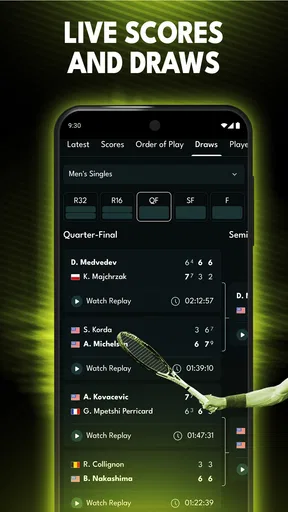
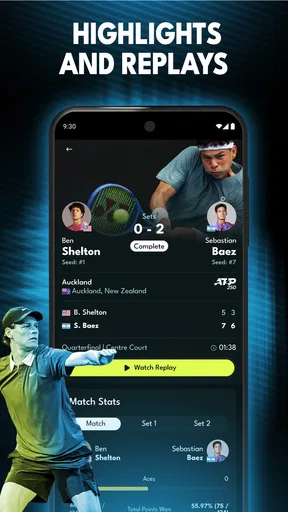
The app boasts a slew of features designed to enhance your viewing experience. Live streaming is obviously the main attraction, but there’s more to it. You can catch full match replays and highlights if you miss the live action. Plus, with the option of multi-court coverage, you can switch between matches as effortlessly as flipping channels. Oh, and did I mention the on-demand archives? You can dive into a treasure trove of classic matches anytime.
Stats and More are also part of the package. If you’re a stats nerd like me, you’ll appreciate the in-depth match statistics that accompany each game. It’s like having your mini sports analyst right there with you, breaking down every serve, volley, and ace.
Acing the User Experience
Now, you might be wondering about the user interface. Is it user-friendly, or will it have you fumbling like a newbie on the court? Well, worry not! The design is intuitive, ensuring that even the least tech-savvy among us can navigate it with ease. With just a few taps, you can be watching Federer or Nadal in action.
The streaming quality is impressive too. You won’t have to deal with buffering nightmares or pixelated players. The videos are crisp and clear, provided you have a decent internet connection.
Subscriptions and Pricing
Of course, quality streaming comes at a price. Tennis TV - Live Streaming offers monthly and yearly subscriptions. While it might be a bit of an investment, the sheer volume of content available makes it worth every penny. Plus, if you're as crazy about tennis as I am, it’ll feel like a small price to pay for the joy of watching live matches wherever, whenever.
Final Thoughts
Overall, Tennis TV - Live Streaming is a must-have for anyone passionate about tennis. It brings the world of ATP right to your fingertips, ensuring you never miss a moment of the action. Whether you’re a die-hard fan or just someone who enjoys the occasional match, this app is likely to satisfy your tennis cravings.
So, if you're ready to dive into the world of live streaming tennis, give Tennis TV - Live Streaming a shot. It might just become your new favorite app. Game, set, match!
Who gets the most from a dedicated tennis app
The strongest fit is someone who follows the ATP Tour closely enough to value live matches, full replays, highlights, and archived tennis in one place. It can also suit a player who likes to study patterns: match statistics alongside a replay make it easier to notice how a contest changed, rather than relying on a quick score summary. I’d use that combination to revisit a pivotal stretch or compare how a player handled different phases of a match.
By contrast, I would skip it if I mainly want broad sports coverage, casual headlines, or scores from many different competitions. A general sports app is more convenient for that mixed diet, while a broadcaster or regular TV service may be a better fit if I already watch tennis through an existing package. The key question is not whether tennis is interesting, but whether ATP-focused viewing is important often enough to justify a specialist app and any purchase I choose.
How it compares with other ways to follow tennis
Compared with free scoreboards and news apps, this service is built around watching rather than scanning. Scores are quicker when I have only a few seconds, but they cannot provide the rhythm, tactics, and tension that make a close match worth following. Compared with a general sports streamer, the appeal here is its tennis focus and the mix of live viewing with replay-oriented material. The trade-off is that a narrower focus will not replace a broad subscription for someone who wants several sports.
I also would not treat an archive as a substitute for live coverage when the shared, real-time event is the point. Replays are valuable for catching up, studying a match, or watching at a better time, but they do not provide the same feeling as following a finish as it happens. On the other hand, if my schedule is unpredictable, on-demand viewing can be more useful than a live-only habit. The best choice depends on whether I value immediacy or flexibility more.
Useful expectations before subscribing
The app is listed as free to download, with in-app purchases ranging from $16.99 to $94.99 per item. I would treat those as a reason to inspect the purchase screen carefully, not as a promise that one particular package is right for everyone. Before paying, I’d check what the selected option covers and whether it matches the tournaments and viewing pattern I actually want. Someone who watches only occasionally may find a free scoreboard plus occasional television coverage more sensible.
It is a sports app from ATP Media Operations Ltd, released on December 17, 2021, and it has an average rating of 3.7 from around 7,300 ratings, with about 337 written reviews. It has over one million installs, is rated for Everyone, and is free to install. Those details give a sense of its audience and position, but they do not predict whether playback will work well on a particular device or network. I would use the app’s own purchase and access screens as the deciding point for a subscription.
My practical verdict
For a committed ATP follower, this is a sensible way to make tennis fit around a changing schedule: watch live when the timing works, return to a replay when it does not, and use statistics to add context instead of relying on highlights alone. My best advice is to test the connection and account access before an important match, choose a main court rather than bouncing between every option, and check the exact purchase terms before subscribing.
If you mostly want quick scores, other sports, or a service you can leave running in the background without caring which tour is playing, I’d choose a broader alternative. But if ATP tennis is the sport you deliberately make time for, this specialist app has a clear purpose and useful ways to catch up. I would recommend it to that audience, with the simple caveat that a focused service earns its place only when you use its tennis coverage regularly.
Pros
- High-quality streaming with minimal lag.
- Wide coverage of ATP and WTA matches.
- User-friendly interface for easy navigation.
- Comprehensive player stats and match analysis.
- Supports Chromecast and AirPlay for TVs.
Cons
- Requires a subscription for full access.
- Occasional geo-restrictions on content.
- Limited customization for notifications.
- No offline viewing option available.
- Some users report app crashes on updates.
FAQs for Tennis TV - Live Streaming
What features does Tennis TV - Live Streaming offer?
Tennis TV - Live Streaming provides access to live broadcasts of ATP and WTA tournaments, highlights, and replays. Users can enjoy a wide range of match coverage, player interviews, and exclusive behind-the-scenes content. With a user-friendly interface, it's easy to navigate through different sections and find your favorite matches.
Is Tennis TV - Live Streaming available worldwide?
Yes, Tennis TV - Live Streaming is available worldwide, allowing tennis fans across the globe to watch matches live. However, some content may be restricted in certain regions due to broadcasting rights. It's advisable to check the app’s availability in your region before subscribing.
What are the subscription options for Tennis TV?
Tennis TV offers both monthly and annual subscription plans. The monthly plan provides flexibility, while the annual plan offers a discounted rate for long-term users. Subscriptions can be managed directly through the app, giving users the freedom to upgrade or cancel anytime.
Can I watch Tennis TV on multiple devices?
Yes, Tennis TV allows you to stream content on multiple devices. The app is compatible with smartphones, tablets, and smart TVs, providing versatility in how you choose to watch. You can log in to your account on different devices, but ensure that your subscription plan supports simultaneous streaming.
Does Tennis TV offer offline viewing?
Currently, Tennis TV does not support offline viewing. All content is streamed live or on-demand, requiring an internet connection. While this allows for real-time updates and instant access to matches, users need to have a stable internet connection to enjoy uninterrupted viewing.


